
Let AI do the work, not only answer questions
After the first piece went out, a reader did something in the comments. They sent Doubao the letter my mother wrote me in 1983 — the first family letter I received at university — and pasted the result back.
Honestly, I was both startled and pleased.
The startling part first. Doubao misread several places. My younger brother's name, Jianming, became Yanming. The school he transferred to, written in the letter as Shannan School, became Nanzha School.
It still gets characters wrong.
The pleasing part. After reading the characters, it wrote a summary of the letter, and the sense of it was entirely right:
> We received your letter and learned that your father got home safely, so you can stop worrying. Since you left, your mother has missed you, and what she worries about most is whether you are eating. She tells you again and again to take care of your health. Spending a few hundred yuan over four years is nothing. Do not starve yourself into a stomach illness. You need not worry about money at home. If you are short, just say so.
It also added a note on the times: in the 1980s, 400 yuan was a serious sum. The mother did the arithmetic. Setting aside 400 yuan over four years, so that a son studying at Peking University could eat well and stay healthy, was worth it.
A few characters were wrong. The letter, it understood.
The picture does not show the rest, so I will add a true story.
Later my father came to Peking University to bring me my luggage. He saw that every meal in the Beijing canteen was steamed buns. At home in Jingjiang we usually had rice at noon and noodles in the evening. His heart sank: this child will not be used to the food. Back home, he told my mother that their son was not eating well there.
And the truth? I was eating happily. Buns and a dish every day, everything around me new. I envied the classmates from the big cities, who could drop a historical allusion into ordinary talk. Everywhere I looked, something was new.
So the point Doubao caught — "what she worries about most is whether you are eating" — it really had understood my mother.
There is a second half to this. After children grow up, a great deal of what parents worry about is unnecessary. What they worry about is often not your situation. It is the situation they imagine you are in.
That reader's message also asked a question for many others:
"Teacher Gong, in the first piece WorkBuddy read the letter in bits and pieces. Doubao was fast and good. Why not just send the letter to Doubao?"
A fair question. Two reasons.
1. Privacy first: whose server does your letter land on
Sending the photo of a letter straight to Doubao means the photo is uploaded to its servers, kept under the platform's rules, and used for the job. A letter is private. My mother's handwriting, the household accounts, my brother's schooling — all of it is on that page. Whether you can accept that is for you to weigh.
WorkBuddy does it differently. Word and Excel files, and photographs of letters, are first transcribed on your own computer. Only the passages of text that a large model needs to understand are sent to the cloud for a short time. The whole file is not uploaded. The official terms also say those temporary fragments are kept for at most 14 days, then cleared automatically.
Here is an example from my own use. I asked WorkBuddy to transcribe a long meeting recording. It recognized the recording as an internal company meeting, so it turned the audio into text and analyzed it locally. Only when the text needed to be organized did it send part of the content online for a short time. The original recording stayed on my computer.
A few other things are worth remembering:
- Do not put names, national ID numbers, bank card numbers, or passwords into the chat box.
- The default permissions are enough. Do not casually turn on "allow full access." Section 3 explains this.
2. Then the real difference: an AI that chats, and an AI that works
Doubao, DeepSeek, and tools of that kind are large language models. They are good at understanding what you say. Chat, translation, drafting, slides — a single task of that sort, they do well.
WorkBuddy is another kind of thing, an agent. OpenClaw, which had a burst of attention last year and which people online call the "little lobster," is the same kind. The difference is one sentence:
A large language model can take instructions. An agent can do the work.
Once you authorize it, an agent can read the files on your computer, operate the computer for you, and carry out what you have in mind. It is a real digital employee.
The first piece went through the seventy years in which the way people speak to computers kept getting easier: zeros and ones on punched tape, then assembly, then high-level languages such as COBOL, C, and Pascal, then databases. At every step you had to learn a language before the computer would work for you.
It is different now. You speak plain language, and the computer does the work. That is the agent era.
What can an agent do? A few examples from ordinary life:
- Look after the computer: tidy the disk, deal with viruses, install software, clear space.
- Turn every document on the computer into a catalog, and pick out what matters.
- Write a document and send it out by email.
- Connect to a stock-price program and sound an alarm when a price is reached.
There is now something called an OPC, a one-person company. One person uses an agent such as OpenClaw to put a whole business process together: find opportunities, write articles, publish them to a WeChat account, Douyin, and Xiaohongshu, and follow what is being talked about. A computer with a few digital robots on it is a small company.
3. Four small things, so you can actually use WorkBuddy today
Points: remember to collect them every day
On the computer version of WorkBuddy, the daily points have to be collected. When you see "collect points," click it. At present you can collect 100 points a day. Teachers and university students receive 1,000 points after verification. Points are money. When they run out, you have to pay to keep going.
Note: only the computer version can collect points.
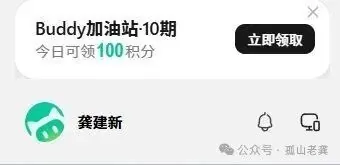
The number at the lower right of each task shows how many points that task used. You can see what you are spending.
How to choose a model
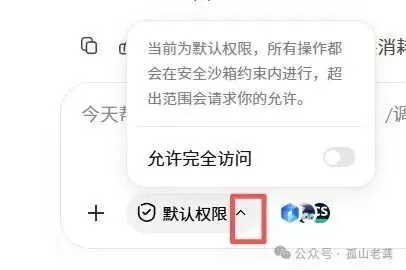
For ordinary jobs, choose Fast. For a hard problem, choose Ultimate. If you want to spend less, look for the label that says free for a limited time.
The numbers in the menu, such as 0.21x, 0.79x, and 0.00x, are the price. If the number is 0, that task does not spend points.
Want to try a model from abroad? Click "configure a custom model," buy an API in the model market, and you can connect Elon Musk's Grok, OpenAI's Claude, and Google's Gemini. Many people have asked about this, so a later piece will be devoted to it.
Permissions: leave the default alone
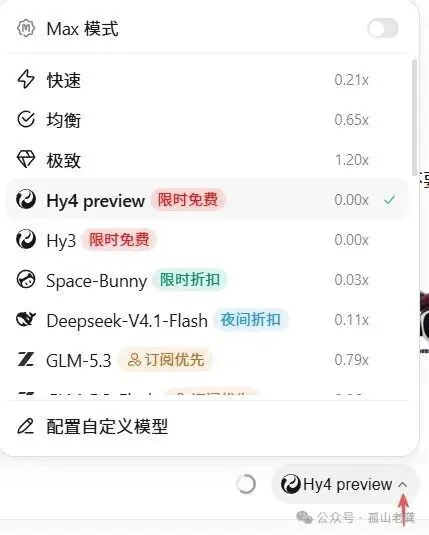
By default, WorkBuddy keeps every action inside a safety sandbox, and asks your permission before it goes outside that range. I suggest you stay with the default. Do not casually switch on "allow full access."
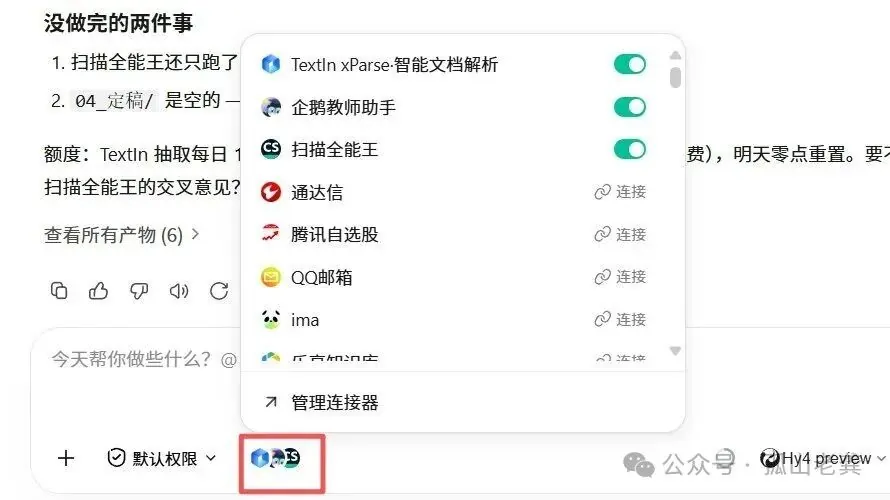
Connectors: reaching the outside world
The small icon beside the chat box is the connector. WorkBuddy can connect to an outside web page or program and work with it. Whether that costs money depends on the outside provider.
4. Skills: turn what you know into something you can use again
You can use WorkBuddy without writing a skill. There is a problem, though. If you send it a family letter, it does not know what you want. Read it? Correct the wrong characters? File it? Work out who the people are? Make a glossary of the dialect? Put the events in order?
If you do not say so, it will not do those things.
A skill is that whole set of instructions, fixed in place: read, correct, file by folder, identify people, match the dialect, and sort out kinship, the order of events, and the shape of the family. Write it once as a skill, and every later letter follows the same rules.
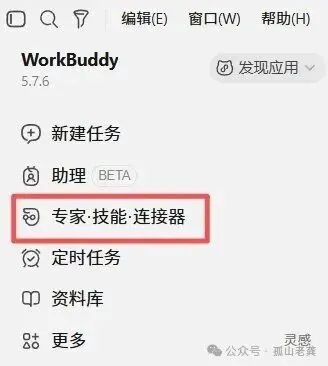
Where is it? In the sidebar, under Experts, Skills, and Connectors:
Back to my own case. I have more than 300 letters: letters with my parents from my university years, and letters with relatives, university classmates, and middle-school classmates. Those letters are a mark of an era, and a store of writing I do not want to lose. I want all of them digitized.
After a few letters, I found that WorkBuddy is genuinely good at organizing. It can sort what a letter says and how the people are related, remember the events, and check them against each other. General ability only goes so far, so I wrote a skill inside WorkBuddy called Shiguang Jiachuan. It follows the thread of who is related to whom, builds a dialect glossary, and files letters by person and by event.
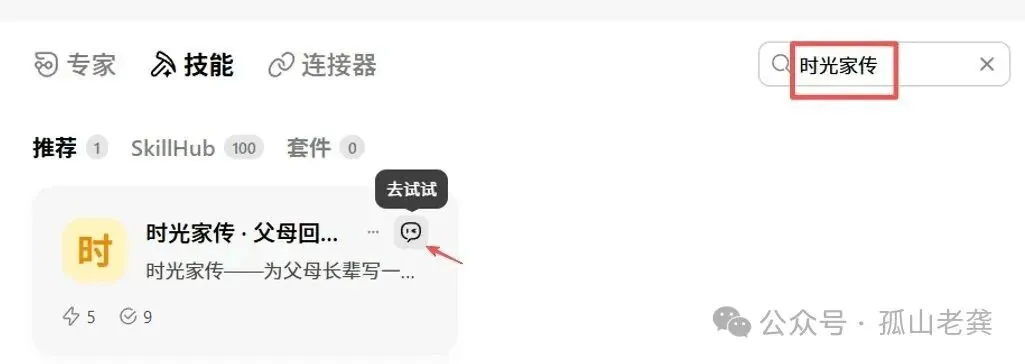
The skill is already in the skill market. Search for 时光家传 and you can use it:
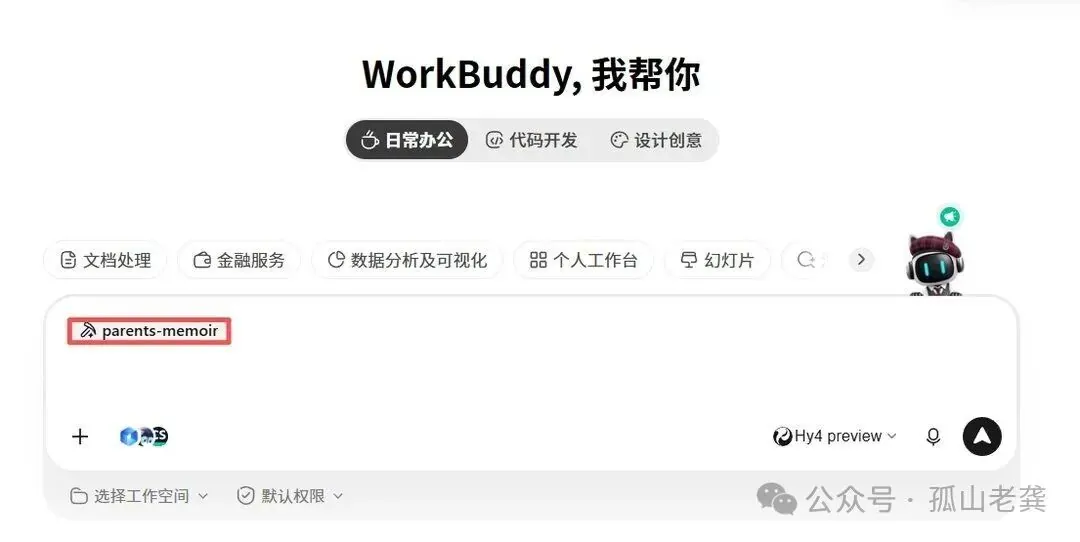
Select it, go back to the home screen, and start:
It is not only family letters. Any writing at home that is worth keeping — old account books, old notes, old diaries — can be sorted the same way. After you use it, I would like to hear what it did for you.
In a later talk I will go through how Shiguang Jiachuan was built, step by step. You can also turn your own work, or an old craft you know, into a skill and publish it.
5. Back to the question from the first piece: the handwriting is inaccurate. What then?
At the end of the first piece I promised to show you how to make the reading more accurate. Here are three ways.
- Photograph it clearly. Hold the phone straight above the letter. Avoid glare. Send it in high resolution if you can. Those three things change the accuracy at once.
- If privacy does not matter to you, send it straight to Doubao. It reads well. Paste the text back into Word and keep it. This is the least trouble, and the price is that the photograph of the letter sits on someone else's server.
- Read it aloud into WorkBuddy's microphone. Open the picture of the letter, turn on voice input, and read the letter into the microphone. Speech recognition is very accurate now. Afterward you correct a few wrong characters. If you want the historical material to stay true, reading it yourself and checking it yourself is worth the time.
6. One last thing
This era does not require you to be a programmer. Anyone can use AI to do their work better, and have the machine work the way they think.
Tell me what old thing you have that you want AI to help sort out. A letter, a photograph, an account book, a notebook — any of them. I will arrange the later pieces around what you say. Try the Shiguang Jiachuan skill. You only get the feel of it by using it. After you have used it, tell me what it was really like.
I am Gushan Laogong, from Gushan in Jingjiang. See you next time.
Previous: Seventy years of computers
Next: How do you sort the family letters in a drawer? I taught AI to understand Jingjiang dialect
First published on the WeChat account Gushan Laogong: Let AI do the work, not only answer questions