
How do you sort the family letters in a drawer? I taught AI to understand Jingjiang dialect
This piece is about three things:
- How I trained an AI until it became a "Jingjiang expert."
- How you can use it now to write a family history. The skill stays free.
- Four small techniques: voice input, the layout, sending photos from a phone, and which tool to use for which job.
In short. I photographed the first letter my mother wrote me at university and sent it to WorkBuddy. It recognized a good many characters. The Jingjiang dialect and the local customs, I still had to explain line by line. There are more than 300 letters like this at home, and more than 100 of them are family letters. I moved house several times and never could throw them away. This piece only tells how I trained the tool to understand Jingjiang speech, and where you can start.
1. How Shiguang Jiachuan was built
Many homes have letters, diaries, and old photographs from decades ago. They lie there quietly.
Some people do want to sort them. Then they look at the yellowed paper and the hurried handwriting, and in a busy stretch of life there is no calm left for the work.
I have more than 300 letters at home. More than 100 are family letters, and more than 200 are letters with middle-school and university classmates. I moved several times and never threw them out.
A few days before National Day I installed Tencent's WorkBuddy. I photographed the first letter my mother wrote me at university and sent it to Buddy. It recognized a surprising number of characters, and it understood the general sense.
When I sent the second letter, and then the third, I found that it asked questions on its own about words it did not understand. Most of those were Jingjiang dialect, or a local custom. I explained them one by one.
When a new name appeared in a letter, it first judged from the earlier material how that person was related to the family. If it could not tell, it asked.
What I found in that process was this: if these letters are going to be properly sorted, the AI needs a mind and a set of rules. You tell it how you want the letters organized, which folders to create, how to classify things, and how relationships should be recorded.
The aim is not only to digitize the material, but to check it, make a complete record, and in the end turn the material into a book — a family history as a PDF.
Programming is something I have never stopped doing. For the last two years AI has written most of the code. I assign the task and check the result. Even that still asks for some foundation in programming.
After the WorkBuddy agent appeared, it claimed you could build a skill just by talking to it. This time I wrote no code. I kept training WorkBuddy until the documents took the shape below.
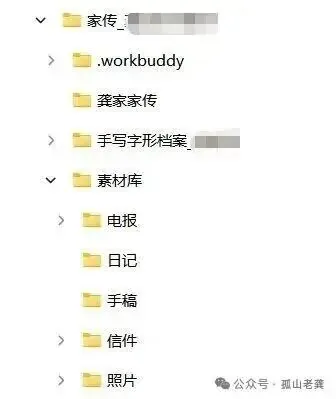
Along the way the relationships between people came out clearly, and every dialect word and local custom was written into a document of its own:
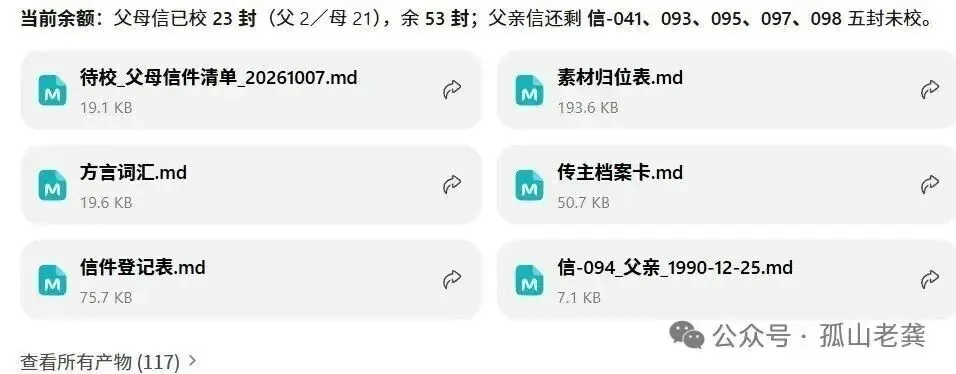
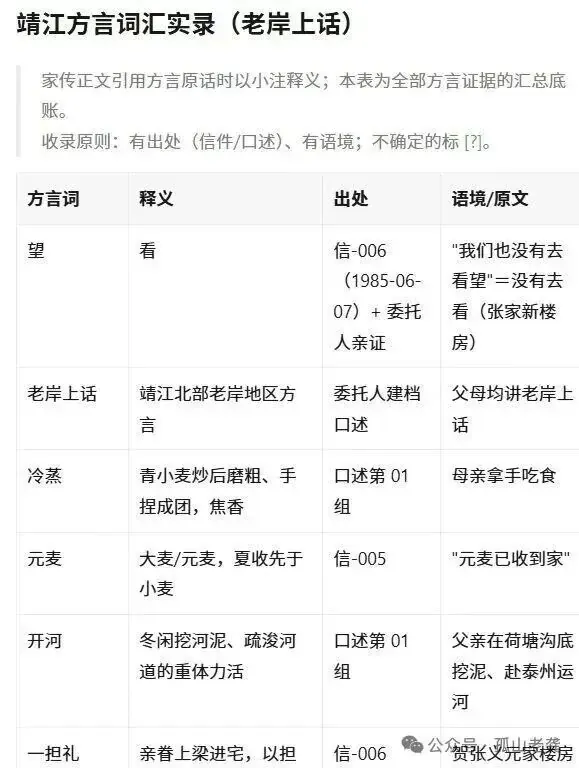
After that training, the letters I scan in are understood in Jingjiang speech. I had turned WorkBuddy into a Jingjiang local.
That is the whole process. When the sorting was done, the Shiguang Jiachuan skill was done too. I submitted it to the WorkBuddy skill market, and it passed review.
2. You can use it to write a family history
Because the skill already exists, sorting letters and old photographs with it is now straightforward.
In WorkBuddy, open Experts, Skills, and Connectors, search for 时光家传, and click Use. You can also just tell it in the chat to install the skill.
Paste this into Buddy's chat. Change the folder d:\家书汇 to whatever fits your own computer:
> Find the skill Shiguang Jiachuan in the skill library and install it. I want to use it to write stories about my parents. Save every file in d:\家书汇. Create the folders for me, and teach me how to begin.
Everything after that is work you do together. Put the scans of the letters in. At the start, tell it the first folder, the place where all the material should be sorted.
The rest is conversation. Talk about it however you like, and ask whatever you like.
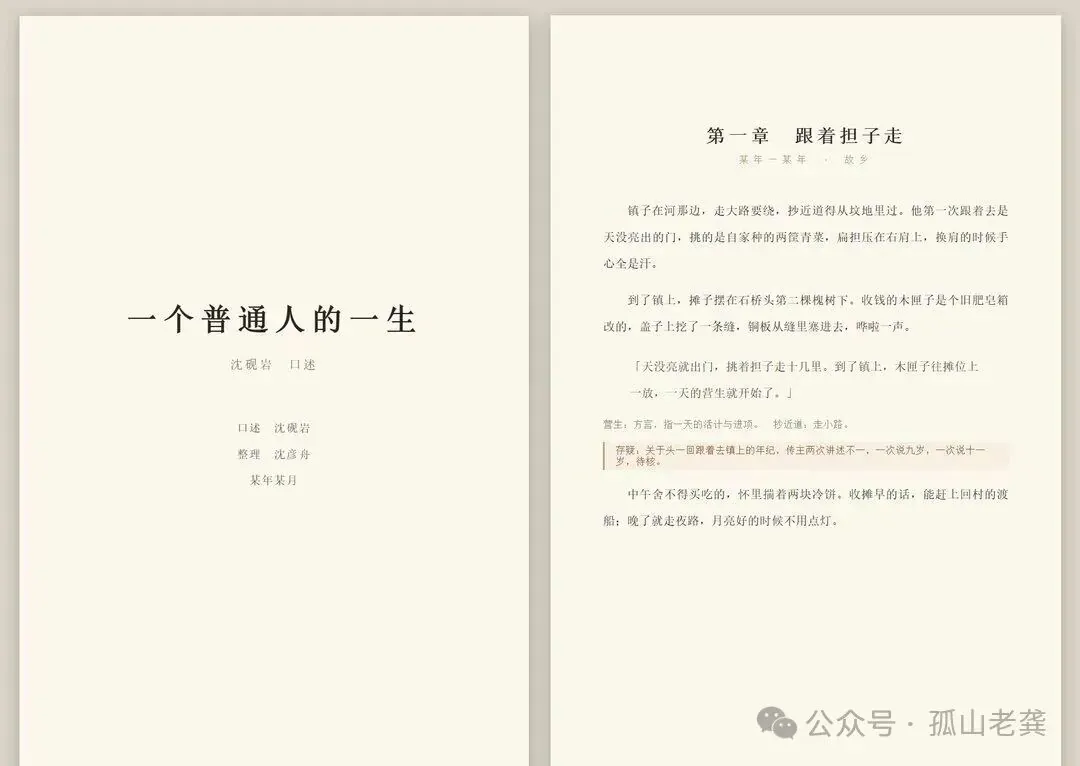
What comes out is a set of documents. From there you can ask it to generate the final family-letter document in Word, and it will generate the whole thing. You edit it and check it, and then it becomes a book:
Every operation in WorkBuddy happens on your own machine. On that point you can be at ease.
If something in the Shiguang Jiachuan skill does not work smoothly, or if you have a better idea, tell me. I will improve the skill so more people can use it. The skill stays free.
A business opening. Let someone else use the Shiguang Jiachuan skill to enter and sort the letters. You do the second pass: revise, polish, and deliver an illustrated family history plus an electronic archive, and even connect it to a publisher. Run it as a one-person company, and hand publicity, publishing, finding customers, and after-sales to digital employees. The original piece says 68 million older people want to write a memoir, fewer than 3 percent manage it, and children pay in nine cases out of ten. On price: a memoir of 60,000 to 70,000 characters written by a person used to cost as much as about 100,000 yuan at the high end. The price has come down, and most now cost 10,000 to 30,000 yuan.
3. A few small techniques
When you check a letter, use the microphone icon
Click the small microphone on the right of the chat box. If voice input is not working, ask it to fix the problem for you.
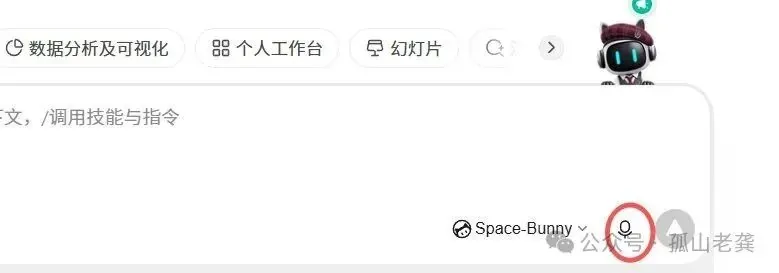
Type this:
> When I use the small microphone icon in WorkBuddy for voice input, speech-to-text does not work. Please diagnose the problem automatically and repair it.
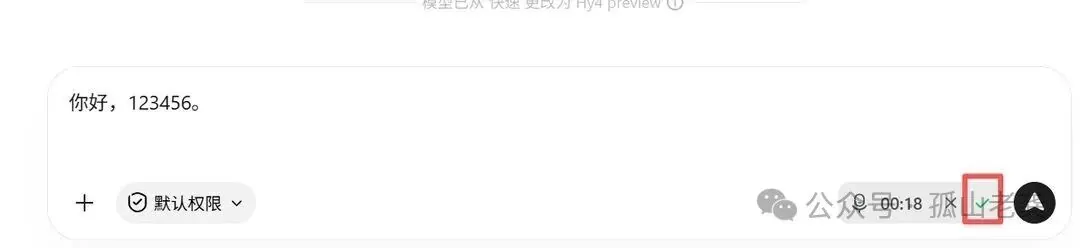
- After a little more than ten minutes, it says the repair succeeded. Click the microphone icon again, and you should see the recording icon.
- Open a document on the computer, or open a handwritten letter, and read the letter aloud.
- When you finish, go back to the Buddy screen and click the green check mark.
- The text of the letter is now on the screen. Check it once, and the letter is accurately stored as digital text.
Tired of a screen split into three? Look at the two icons at the upper right
One thing about Buddy still bothers me. The screen is split into left, middle, and right, and that is tiring to look at. The remedy is two icons at the upper right of the window. You should know what they do.
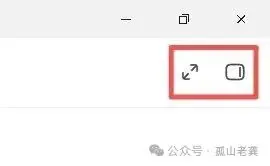
The icon on the left, inside the red box, enlarges and shrinks the window. The icon on the right opens and closes the side panel.
If you do not know this, the right-hand panel is sometimes open and the chat is only half a screen, which is unpleasant. A small thing like that is often enough to make a person give up on Buddy.
How to send a photo taken on your phone to WorkBuddy
- Sign in to your personal WeChat on both the phone and the computer.
- On the phone, search for File Transfer, open the chat, and take the photo there.
- On the computer, in the same File Transfer chat, select the photos you just uploaded and copy them, or press Ctrl+C.
- Move the mouse to the WorkBuddy chat box, right-click, and paste, or press Ctrl+V.
- The letter photos are now in WorkBuddy. Click send, and Buddy starts reading them.
One suggestion: do not bother Buddy with simple jobs
For a simple job, use DeepSeek or Doubao. They are fast. For a complicated job that needs the computer operated, Buddy is the better one to put to work.
Have you started? Find the letters at home, or record your parents and listen to them tell the family stories. Old photographs and videos can be sorted by Buddy too.
I hope you will actually begin.
Next time I will talk about sorting the pictures and photographs on a computer, which is what several readers have asked for. If you have a request, leave a message. I will put the most requested subjects first and explain them sooner.
Previous: Let AI do the work, not only answer questions
If you want the commands for making an electronic copy or a PDF, reply 家书 in the chat of the WeChat account Gushan Laogong, and it will be sent to you automatically.
First published on the WeChat account Gushan Laogong: How do you sort the family letters in a drawer?